Twin Health
- 4.6
- Rating
- 100.00K
- Installs
- Free
- Price

 Analysis by App-foxy
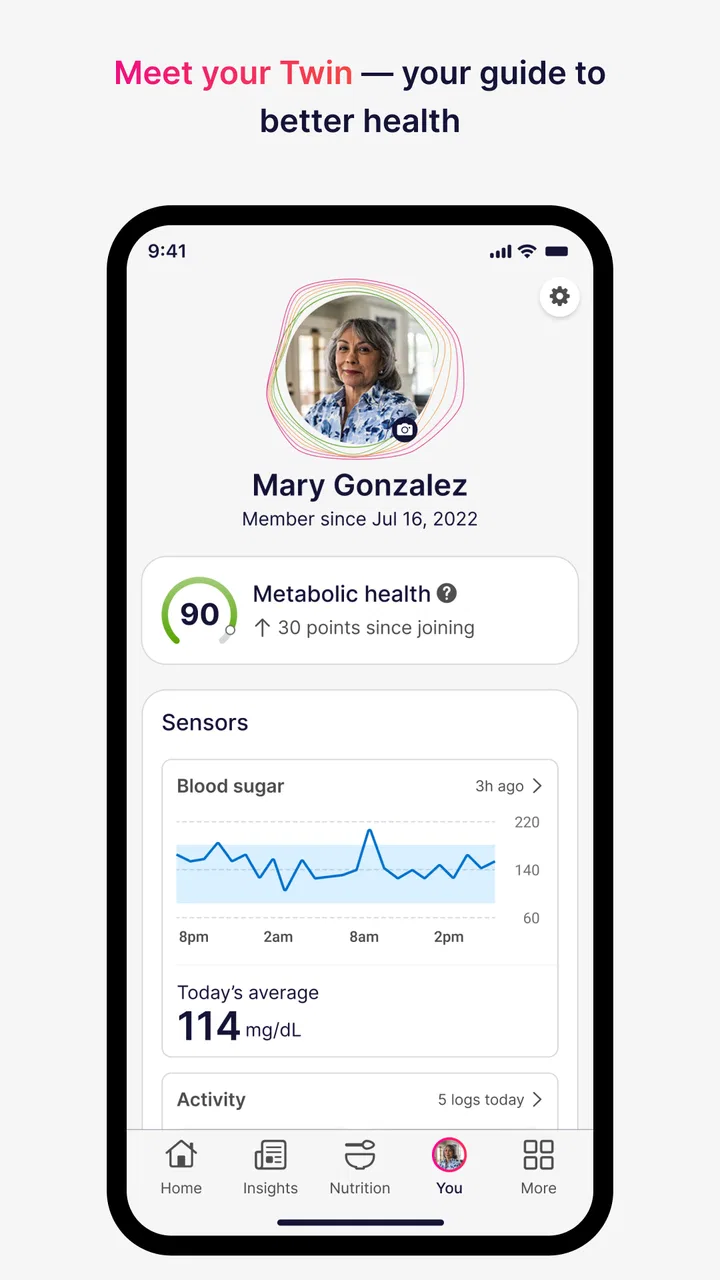
I approached Twin Health as a medical app rather than a general wellness tracker. Its purpose is to support metabolic health through precision-health technology, so the important question is not whether it looks busy or motivating, but whether its approach fits the way you want to understand and manage your health. After spending time with it, I see a focused tool for people who are willing to engage with health guidance over time, not a quick calculator that gives you a single answer and sends you on your way.
The app is developed by Twin Health and is available free of charge for everyone. It has built a solid audience, with more than one hundred thousand installs and an average rating of 4.6 from roughly 2.4 thousand ratings. Those figures suggest that many users find value in the experience, while the smaller body of written feedback is a reminder that health apps can feel very personal: a workflow that suits one person may feel too involved or too limited for another.
My overall impression is cautiously positive. I like the idea of bringing health information and daily decisions into one place, especially for someone trying to make sense of metabolic habits rather than chase a short-term result. At the same time, I would not treat any app in this category as a substitute for a clinician, a diagnosis, or urgent medical care. The best way to use it is as a structured companion to professional advice and your own observations.
You May Also Like

 Blood Strike: 2.5 Anniversary
Blood Strike’s Loadouts Turn Every Drop Into a Tactical Gamble
A close look at Blood Strike’s custom loadouts: how fast access to signature weapons reshapes its battle royale rhythm, rewards preparation, and narrows the gap between fights.

 Pandora - Music & Podcasts
Pandora’s Music Is Easy to Start, but Harder to Recover
Pandora’s strength is its low-effort path from a seed to a station. Its weak spot is how much confidence it asks you to place in connection, setup, and quiet recovery.

 8 Ball Pool
 Is Built on Rivalries, Rematches, and Routine
A close look at the rivalries, rematches, shared routines, and unanswered safety questions that turn a quick pool match into a persistent mobile community.

 Samsung Music
’s Quiet Strength Is Playing What You Already Own
Its reach comes less from spectacle than from dependable access to a personal library. That simplicity is both the app’s strongest retention engine and its ceiling.

 AccuWeather: Weather Radar
AccuWeather Review: A Quick, Clear Forecast for Everyday Decisions
For everyday plans, the best forecast is the one you can understand quickly. AccuWeather makes rain timing, radar, and local conditions easy to act on, with a few trade-offs.

 Hill Climb Racing
Why Hill Climb Racing Still Turns Crashes Into One More Run
A tiny car, a bumpy hill and one more upgrade: Hill Climb Racing keeps resurfacing because its simple chaos makes every near-miss feel personal.
More From Our News Desk



What the app is trying to do
The phrase “precision health” can sound more dramatic than it needs to be. In practical terms, Twin Health is aimed at making metabolic health feel more individual than a generic list of diet and exercise rules. That focus matters because people often react differently to the same meal, schedule, sleep pattern, or activity level. A useful app should help you look at your own routine instead of assuming that one universal plan works for everyone.
I found the medical positioning helpful because it sets a more serious expectation. This is not an entertainment app with a few health-themed badges added on top. It belongs in the medical category, and that changes how I judge it. Clarity, restraint, and user control matter more than flashy presentation. When an app deals with sensitive health information, I want to understand what I am being asked to do, why it matters, and what choices remain mine.
The current release is version 4.200.0, and the app supports devices running Android 9 or later. That makes it accessible to many Android users without requiring a very recent phone. I still recommend checking your device before planning a long-term routine, because health tracking is most useful when the app runs reliably and does not become a source of technical interruptions.
A realistic day with Twin Health
Imagine someone who has been told to pay closer attention to metabolic health but keeps losing track of what happens between appointments. In the morning, that person can use the app as a reminder to stay aware of the day’s choices rather than relying on memory at night. After lunch, it can become a place to reflect on whether the meal, timing, and energy level fit the broader pattern they are trying to understand. In the evening, the value is less about judging one decision and more about noticing what can be discussed with a healthcare professional.
That workflow is more realistic than expecting a perfect routine. People miss entries, change schedules, eat differently on weekends, and have stressful days. I would use Twin Health consistently enough to create a useful record, but I would not let an incomplete day make me feel that the whole effort has failed. The app is more valuable as a long-view aid than as a daily scorecard.
One practical tip is to decide in advance what you want from the app. If your goal is to prepare for a medical conversation, focus on keeping observations organized. If your goal is to understand how habits affect your energy and routine, use it as a prompt for regular reflection. Without a clear purpose, even a well-designed health tool can turn into another notification that is easy to ignore.
Trust starts with the account you create
Health information deserves a higher level of attention than ordinary app content. Before committing to regular use, I would read each setup screen carefully and avoid accepting choices automatically. The important details are not just the app’s name or rating; they are the account controls, the information requested, and the choices presented when you begin.
I also recommend using a password you do not reuse elsewhere and keeping your phone protected with its normal screen lock. That advice is not unique to Twin Health, but it matters more when an app is connected to personal health details. If you share a device with family members, check whether notifications or previews could reveal information on the lock screen. A private app can still expose sensitive context through a careless notification setting.
The app’s free price removes one common barrier, but free does not mean that privacy decisions become unimportant. I would not judge the service only by whether money changes hands. I would judge it by how clearly it explains data choices, how easily I can review permissions, and whether I can make informed decisions without being rushed through setup.
Permissions and data choices deserve active attention
My trust in a medical app comes from visible controls, not assumptions. When installing or updating Twin Health, I would review the permissions requested by the operating system and ask whether each one makes sense for the task I want to perform. If a permission is optional, declining it may be the right choice until I understand its purpose. If a function depends on a permission, I want that relationship explained plainly.
I would also revisit the app’s settings after the first session. People often approve access during setup and never look again, even though their needs change. A permission that seemed useful at the beginning may no longer be necessary later. Checking Android’s permission manager gives you another way to see what access is active, while the app’s own account area may provide additional controls.
There is an important distinction between an app being useful and an app being entitled to every piece of information about you. I would give Twin Health only the access I understand and need. That approach may mean that some convenience features are less automatic, but the trade-off is greater awareness of what I am sharing.
Because the app deals with metabolic health, data-sensitive moments can occur during ordinary actions: entering personal information, reviewing health guidance, connecting another service, or responding to a prompt about your routine. I would slow down at those points. Read the explanation, look for a way to cancel or skip, and avoid entering details simply because a screen makes them feel mandatory.
Where user agency matters most
A health app should support decisions, not replace them. I appreciate Twin Health more when I think of it as a way to organize attention around metabolic health rather than as an authority that can settle every medical question. If a recommendation conflicts with advice from your doctor, the appropriate response is to pause and ask questions, not to follow the app automatically.
This is also where the app may not suit everyone. If you want a very simple step counter, a basic food diary, or a minimal reminder tool, Twin Health may feel more specialized than necessary. A general fitness app can be a better fit for someone whose main interest is exercise tracking. A spreadsheet or notebook may even be preferable for a person who wants complete control over their own records and does not need a guided medical workflow.
On the other hand, someone who feels overwhelmed by disconnected health tools may appreciate having a more focused place to build a routine. The advantage is not that it eliminates effort; it is that it can give the effort a clearer direction. My advice is to start with the smallest routine you can maintain. Do not promise yourself perfect tracking. Use the app regularly enough to learn something, then adjust your approach.
Another useful habit is to separate observation from interpretation. Write down or review what happened, but avoid turning one unusual result or one difficult day into a conclusion about your health. Patterns are more meaningful than isolated moments, and medical decisions should be discussed with qualified professionals.
Comparing it with familiar alternatives
Compared with a standard calorie counter, Twin Health feels more concerned with the broader idea of metabolic health than with reducing everything to a food total. That can be helpful if you are tired of treating nutrition as a simple arithmetic exercise. The trade-off is that users who want a large recipe database, detailed meal planning, or a purely numbers-based log may prefer a dedicated nutrition app.
Compared with a fitness tracker, its appeal is more targeted. A fitness tracker is often strongest at movement, workouts, and activity trends. Twin Health is better considered when your interest is the relationship between everyday habits and metabolic wellbeing. If your only goal is to count steps or monitor a run, another category of app is likely to feel faster and less demanding.
Compared with paper notes, the app can offer more structure and a more convenient way to revisit your routine. Paper still wins for simplicity, independence from updates, and total control over where your notes live. I would choose Twin Health when I want guided engagement and a health-focused workflow; I would choose paper when I want a private, flexible journal with no learning curve.
The key trade-off is focus. Twin Health is not trying to be every kind of health app at once. That can make it easier to understand why you are using it, but it also means it may not replace every tool you already use. Before installing, decide whether you want one specialized companion or a complete all-in-one dashboard.
Small frictions that affect long-term use
The biggest challenge with any metabolic-health app is consistency. Even if the interface is clear, the user still has to return, reflect honestly, and make room for the process in a busy life. People who dislike logging, reminders, or health-focused prompts may stop using it quickly. That is not necessarily a flaw in the app, but it is a real limitation for anyone looking for a completely passive experience.
Another point of friction is emotional. Health information can make some users more anxious, especially when they are already worried about symptoms or medical results. If checking the app makes you obsess over every change, reduce the frequency of review and bring your concerns to a clinician. A tool is not helping if it increases fear without improving understanding.
Updates can also change the feel of an established workflow. Since the app is actively maintained and currently at version 4.200.0, I would expect the experience to evolve over time. Keeping an app updated can improve compatibility and security, but it is sensible to review settings after a major update rather than assuming every choice stayed exactly as you left it.
Who should try it, and who should skip it
I would recommend Twin Health to an adult who wants a focused way to pay attention to metabolic health, is comfortable using a medical app regularly, and is prepared to combine digital guidance with professional care. It may be especially useful for someone who has struggled to connect daily habits with longer-term health conversations and wants a more organized starting point.
I would skip it if you want a simple activity counter, dislike entering or reviewing health information, or expect the app to diagnose a condition for you. I would also avoid relying on it alone if you have urgent symptoms or a complex medical situation that requires direct clinical supervision. In those cases, contact the appropriate healthcare professional rather than waiting for an app-based answer.
For families, I would be careful about shared devices and shared accounts. Health information should remain associated with the correct person, and each user should understand whose data is being recorded. For older phones, the Android 9 minimum is helpful, but performance and battery behavior can still vary by device, so a short trial is sensible before building the app into your daily routine.
My cautious verdict
Twin Health makes the most sense when you want a dedicated companion for metabolic health rather than another generic wellness dashboard. I like its focused medical purpose, its free entry point, and the way it encourages a more personal view of health instead of relying only on broad rules. The rating of 4.6 and audience of over one hundred thousand installs show that it has attracted meaningful interest, although popularity should be treated as context rather than proof that it will suit your needs.
My recommendation comes with a clear condition: use it deliberately. Review permissions, read account choices, protect your device, and think before sharing sensitive information. Keep control of your own decisions, and treat the app as a support for conversations with healthcare professionals rather than a replacement for them.
The strongest reason to try Twin Health is its focused approach to metabolic health; the strongest reason to be cautious is that useful health guidance still depends on context, consistency, and informed user choices. If that balance sounds right for you, it is worth exploring. If you want passive tracking or a basic fitness utility, choose a simpler alternative instead.
FAQs for Twin Health
01What is Twin Health and how does it work?
Twin Health is a digital health and wellness app designed to help users understand and improve metabolic health. It typically combines information from connected devices, health data, lifestyle details, and guidance from health professionals or coaching programs. The app may provide personalized recommendations related to nutrition, activity, sleep, and other habits. Available features can vary depending on your location, plan, and healthcare provider.
02Is Twin Health suitable for everyone?
Twin Health may be intended primarily for adults seeking support with metabolic wellness or managing conditions such as blood sugar concerns, but suitability depends on your individual health situation. It should not automatically be considered appropriate for children, pregnant users, or people with complex medical conditions. Before enrolling, review the eligibility requirements and speak with a qualified healthcare professional, especially if you take medication or have an existing diagnosis.
03Does Twin Health replace a doctor or medical treatment?
No. Twin Health should be viewed as a digital support and monitoring service rather than a replacement for a doctor, emergency care, diagnosis, or prescribed treatment. Recommendations within the app may help you track habits and make informed lifestyle changes, but they should not be used to alter medication or ignore symptoms without medical advice. Contact your healthcare provider whenever you have concerns about your condition.
04What devices or health information can be used with Twin Health?
The information collected by Twin Health can depend on the program you join and the devices supported in your region. You may be asked to provide details such as age, weight, medical history, meals, activity, sleep, or glucose-related information. Some plans may also work with compatible wearables, sensors, or other connected health devices. Check the current app listing and program instructions to confirm compatibility before downloading.
05Is Twin Health free to download and use?
Downloading an app does not always mean that every Twin Health feature is free. Access may depend on an employer, healthcare organization, insurance arrangement, clinical program, subscription, or invitation. Some services may require enrollment or eligibility verification before you can use the full experience. Review the pricing, renewal terms, privacy policy, and cancellation conditions shown in your app store or enrollment materials before providing payment information.
Pros
- Personalized guidance can make health goals feel more manageable.
- Tracks several wellness factors in one place.
- Helpful insights may encourage healthier daily routines.
- Progress data can support more informed conversations with doctors.
- Useful for users who prefer structured
- data-driven coaching.
Cons
- Many features may require a compatible wearable or connected device.
- Some users may find frequent tracking and notifications overwhelming.
- Health insights should not replace professional medical advice.
- The app’s value may depend on consistent logging and device syncing.
- Availability of coaching and features can vary by region or plan.

Twin Health
Gallery